Toolbar
FIXME : Image map
This is the toolbar of Gwf. It provides a quick interface to some functions which are often used.
Click on one of the buttons to go to the description of that option.
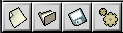
New widget

This creates a new widget.
For an more detailed explanation see the describtion of the
widget-menu/new widget-option.
Top of the page
Open project

This opens an project file.
For an more detailed explanation see the describtion of the
file-menu/open-option.
Top of the page
Save project

This saves an project file.
For an more detailed explanation see the describtion of the
file-menu/save-option.
Top of the page
Write source code

This writes the source code of a project.
For an more detailed explanation see the describtion of the
file-source/write-option.
Top of the page